A Generative AI Study Project: Curriculum and Lesson Handoffs
The course and the AI instructor
I use AI in my work as a programmer, but I have not followed a structured course on generative AI. Using a tool comfortably and understanding how to connect a model to an application involve different things to learn. For this project, I chose one curriculum to work through in order.
The course is Microsoft’s Generative AI for Beginners. After downloading the repository, I asked AI to act as an instructor: explain concepts, guide examples, review code, and check my understanding.
This is the project’s opening record. The lessons and API exercises have not started yet. What exists so far is a study plan, documents for continuing between sessions, and an Obsidian view of the curriculum.
What the 21 lessons cover
The repository contains setup lesson 00 and lessons 01–21. Learn lessons explain concepts; Build lessons introduce examples. Resources include Python and TypeScript code, Jupyter notebooks, and Korean translations. The focus is building generative AI applications with existing models. The mathematics and large-scale systems needed to train models from scratch require separate study.
| Range | Main topics |
|---|---|
| 00–03 | Setup, LLM fundamentals, model selection, responsible use |
| 04–05 | Prompt fundamentals and improvement |
| 06–11 | Text, chat, search, image apps, low-code tools, function calling |
| 12–15 | User experience, security, evaluation and operations, RAG |
| 16–18 | Open models, agents, fine-tuning |
| 19–21 | Small language models and model-family comparisons |
We will follow the lesson order and review programming basics only where needed. API integration, retrieval, function calling, and verification will receive more detailed exercises. Model names and SDK instructions will be checked against official documentation when an exercise is attempted.
The proposed cumulative project is a study assistant that searches and explains the course documents. It will start with basic questions and answers, then add retrieval, external functions, source-backed answers, and an agent with a limited set of tools. That progression is a plan, not a completed application.
The problem with long conversations
A syllabus alone did not address a recurring problem. As conversations with AI grew longer, the original structure could drift, tasks could become scattered, and a side question could make it difficult to return to the lesson. I asked for a project structure that would support continuity.
The first answer about sessions was to open a new one when the conversation became long. That still left me responsible for deciding when to move and explaining what had happened. I corrected the requirement: the instructor should manage the transition and prepare the handoff.
We defined a lesson unit around one learning objective, covering explanation, practice, and an understanding check. The AI should explicitly announce completion and save the next starting point. A long chapter can span several units. Time and calendar dates are not the criteria for switching sessions.
Instructions and state stored in files
We added teaching rules to AGENTS.md and created separate documents for the plan, current state, and accumulated record. Current state contains task IDs, completion criteria, evidence, deferred questions, and the place to return to. Actionable tasks have one source of truth in that document.
Hearing an explanation is not enough to mark a task complete. We distinguish explaining something myself, running an example, and changing a requirement and checking the result. An environment check performed by AI does not demonstrate my understanding.
The handoff to a new session contains:
- Completed objectives and evidence of understanding.
- Unclear concepts and unfinished tasks.
- Exercise files and the last execution result.
- Side questions and the return point in the main lesson.
- Explanations that need not be repeated and the next concrete action.
Reading that handoff is the new session’s first task. Writing instructions to files cannot guarantee that AI will follow them without omissions. The recorded understanding and remaining work still need to be checked against what actually happened in the lesson.
Progress and depth in Obsidian
Obsidian bookmarks group the current state, tasks, document list, learning map, and curriculum Canvas. The task page embeds the checklist from current state. The map is generated from the same state document.
The 22 chapters, including setup, are arranged into 10 study stages. These stages are separate from the course’s chapter numbers. Each chapter shows an observed depth and a target depth.
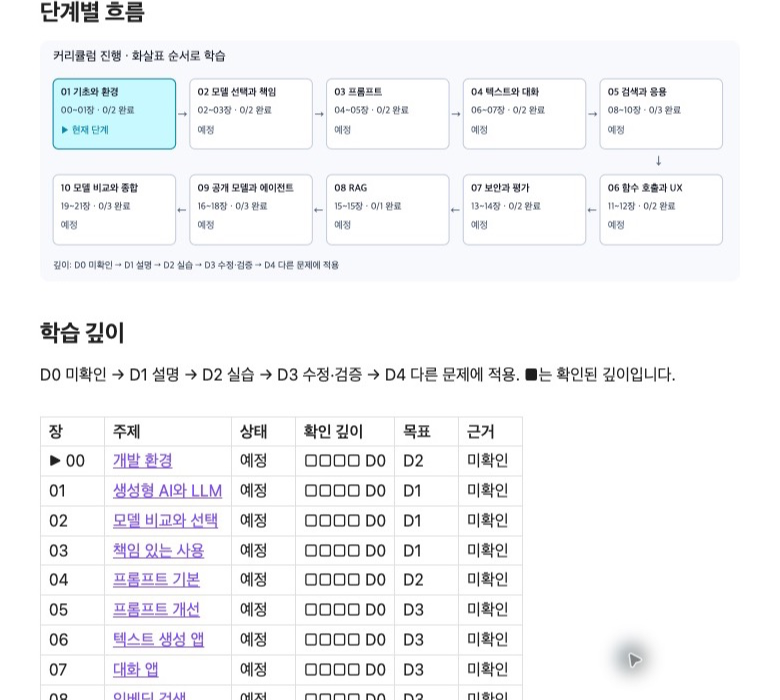
This is an excerpt from the actual Obsidian learning map. Teal marks the current stage; the table separates observed depth from the target. All observed depths are D0 because lessons have not started. The original workspace is in Korean. View full-size screenshot.
| Depth | Evidence to check |
|---|---|
| D0 | Learning or understanding has not been checked |
| D1 | Explain the principle and limits in my own words |
| D2 | Run an example and explain its inputs and outputs |
| D3 | Change a requirement and verify results and failure cases |
| D4 | Apply it to another problem and compare alternatives |
Not every chapter requires D4. A conceptual comparison and an implementation exercise have different completion criteria. Topics that branch from a question retain a parent topic and a return point. Branch nesting and depth of understanding are tracked separately.
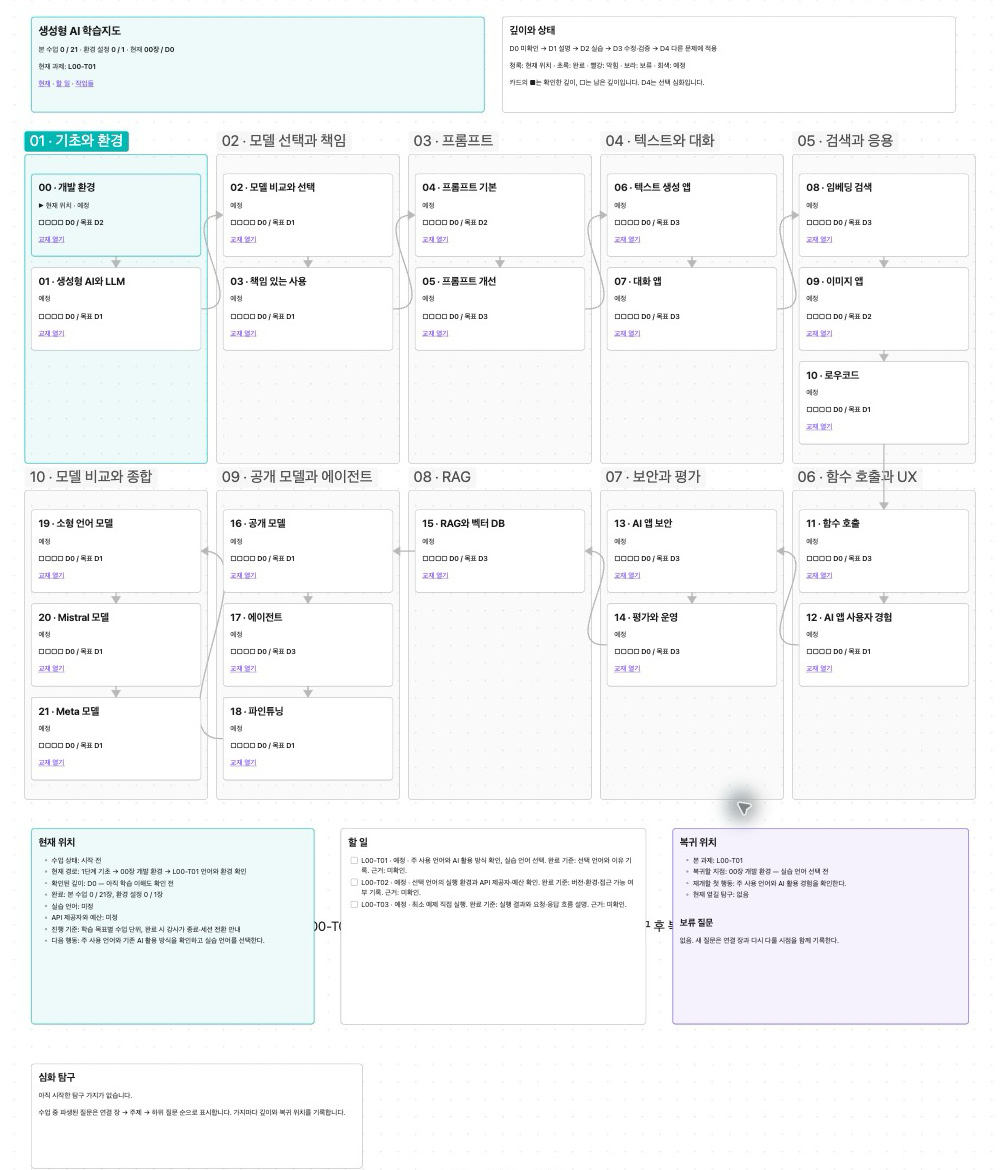
The Canvas displays the same state spatially. Ten stages and their connected chapters sit above the current position, tasks, and return point. The exploration area is still empty. No progress was changed and no sample tasks were added for these screenshots. View full-size Canvas screenshot.
What has been verified and what comes next
We checked that the current-state document, embedded tasks, stage chart, and Canvas display in Obsidian. Checks that left the real study state unchanged also covered completed progress and a branch nested two levels deep. These checks concern the recordkeeping and visualization functions. Whether the handoffs are sufficient across many lessons, and how much they help learning, remains to be seen.
I asked the AI to announce each completed lesson unit clearly and write a blog post about it. Those posts will cover the concepts actually discussed, questions, exercise results, and unresolved points. This overview does not count as completion of a course lesson.
Next is lesson 00: review my usual programming language and existing AI use, then choose the exercise language and execution environment.