AI App Recreation: The Gap Between Screens and Behavior
An AI-built app resembles its reference. The buttons and input fields are present. Stop there, and you can miss a total that never changes when the input changes, or saved values that disappear on reload.
RecreationWorld, released on September 18, 2026 and revised on September 21, provides evidence for examining this gap. On its 250-task RecreationBench, GPT-6 Astra achieved a 58.1% overall score. It passed every programmatic check on 2.8% of tasks. An average score and the proportion of apps passing all required checks measure different things. Paper and publication history
For this article, I examined those measures and used AI to build and test a small calculator example. This is not a replication of the model benchmark. It demonstrates how the checks chosen can change the judgment of the same app.
What 58.1% and 2.8% count
RecreationBench gives an agent interactive access to a reference app and asks it to recreate its behavior. It covers Ubuntu, macOS, Windows, Android, and the web. The deliverable is a runnable implementation.
The overall score aggregates programmatic and visual evaluation. The 2.8% figure is the proportion of tasks passing the complete programmatic suite. It does not mean perfect scores on all visual checks, nor does it estimate the success rate of AI app development in general. Evaluation protocol and metrics
Consider an illustrative set of ten apps, each passing nine of ten checks. The average pass rate is 90%, but no app passes all ten. If the missing check concerns saving data, that failure may matter more to a user than the other 90%. The average across checks and the number of usable deliverables need to be considered together.
Two calculators with the same initial screen
To isolate the difference, I used AI to create two versions of a price calculator. The unit price was KRW 10,000, the initial quantity was two, and the discount was zero. One version deliberately kept its displayed total fixed at KRW 20,000 and omitted persistence. The other calculated from the inputs and saved them in browser storage.
Both versions were opened in the same Chromium environment at the same viewport size. Their initial screenshot files had identical SHA-256 hashes. A hash is a value calculated from file contents; here, the matching captures were also byte-identical. That says nothing about whether subsequent app behavior is identical.
The next checks changed quantity, then discount, then reloaded the page.
| Check | Expected result | Intentionally faulty version | Working version |
|---|---|---|---|
| Initial load | KRW 20,000 | KRW 20,000 | KRW 20,000 |
| Set quantity to 3 and calculate | KRW 30,000 | KRW 20,000 | KRW 30,000 |
| Set discount to 10% and calculate | KRW 27,000 | KRW 20,000 | KRW 27,000 |
| Reload | Keep quantity 3, discount 10%, total KRW 27,000 | Reset to quantity 2 and discount 0% | Expected values retained |
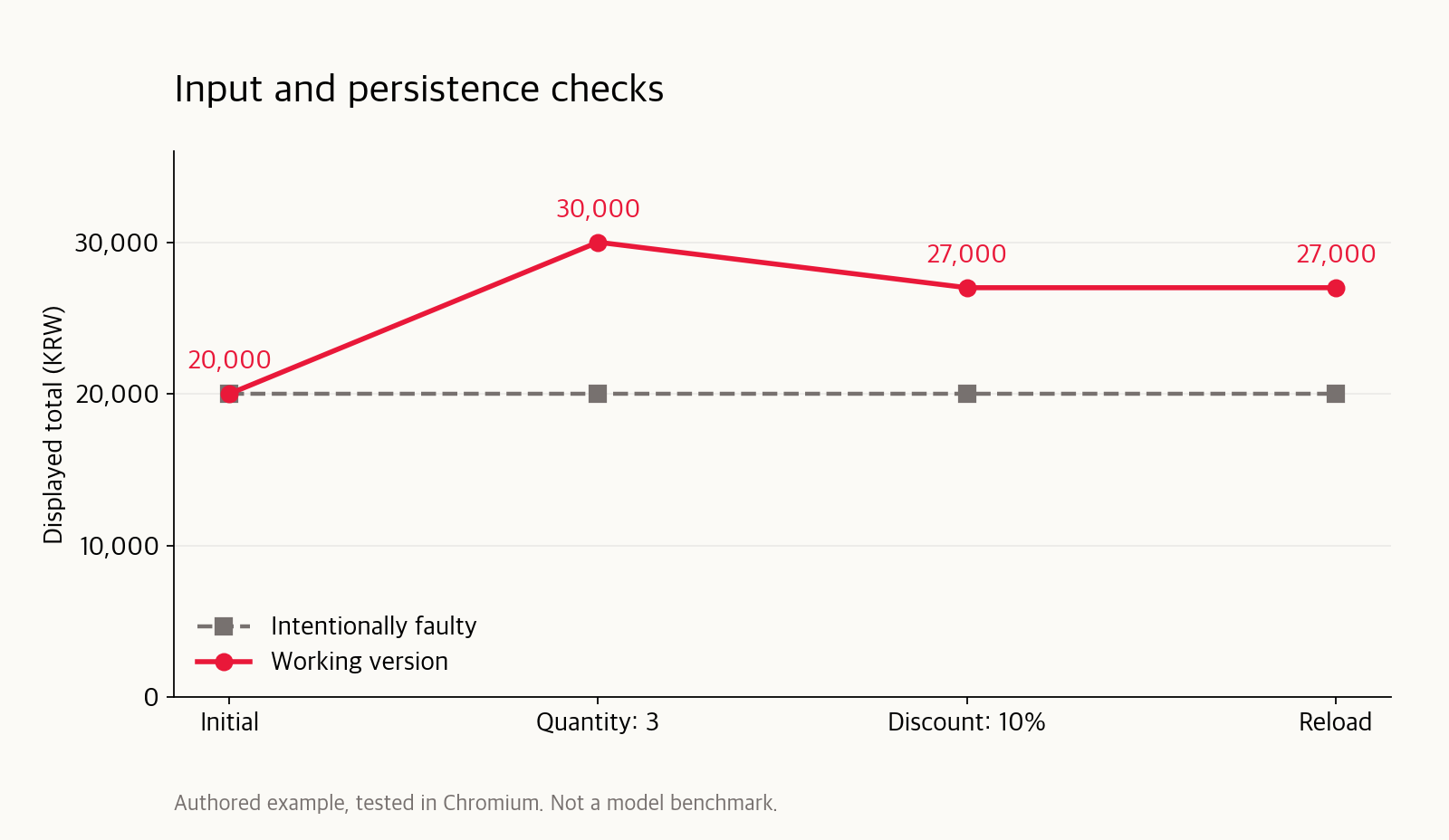
Results from an example authored for this article. The faulty version passed only the first check; the working version passed all four. This does not measure any model’s error rate.
AI wrote the example and performed the browser interactions, value reads, and capture comparison. Expected values were specified using unit price × quantity × (1 − discount / 100) before checking the implementation. Copying an incorrect implementation formula into the test would reproduce the same mistake in both places.
The value after the click
“Clicked the button” omits the result. A screen responding to a click does not establish that its new value is correct. The example pairs each input with an expected value.
await page.locator('#qty').fill('3');
await page.getByRole('button').click();
await expect(page.locator('output')).toHaveText('30,000원');

await page.locator('#discount').fill('10');
await page.getByRole('button').click();
await expect(page.locator('output')).toHaveText('27,000원');

await page.reload();
await expect(page.locator('#qty')).toHaveValue('3');
await expect(page.locator('#discount')).toHaveValue('10');
await expect(page.locator('output')).toHaveText('27,000원');
This snippet expresses the same sequence with Playwright’s expect syntax. The executed script stored and compared expected and observed values at each stage. The Korean currency suffix remains because the example’s interface is Korean.
An initial-screen check covers layout, text, and color. Input checks probe calculation rules; reloading tests retention. These checks do not replace each other. A correct total clipped outside the screen is hard to use, while a faithful screen that loses saved data is still defective.
Assigning state changes as units of work
Applied to development, the brief can become more specific than “finish the calculator.” The following was composed from the example.
Before implementation, list inputs, actions, and expected outcomes.
Change one normal input at a time and calculate its expected result.
Compare actual screen values with those expectations.
For saving, check both immediately after saving and after a reload.
Keep failed and unexecuted checks in the list.
After the last code change, rerun the checks affected by that change.
Changing quantity and discount together makes it harder to identify which calculation failed. Changing one and then the other narrows the cause. Other problems require a sequence: save, close, and reopen, for example.
The check list should start from required behavior. It should not simply conform to whatever code the AI happened to produce. If saving was required but never implemented, removing the persistence check can improve the reported pass rate without improving the app. Marking a check “not applicable” should require establishing whether the requirement actually changed.
Checking after the final edit
This blog’s publication checks also separated “the article opens” from “the correct files were deployed.” Browser checks covered images, language switching, and overflow. Deployment checks compared the verified files with server-side hashes. Hash equality establishes identical deployed bytes; it does not establish factual accuracy or coverage of every possible reader interaction.
Submitting an old screenshot after fixing a calculator creates the same problem. The screenshot may document an earlier version. Completion reports therefore need to identify checks run after the final change, alongside anything still unverified. Before adding more checks, establish which version their evidence describes.
In the AI team integration-review case, individual tests passed before connecting real responses exposed problems. The small example here makes that distinction visible in a single interface.
What these results establish
RecreationBench uses fixed environments and finite suites. It does not represent every live service, change in external state, or real-user path. The paper explicitly notes that passing its checks cannot prove equivalence across all states. Research limitations
The calculator example likewise covers only four stages. It has not been validated against invalid inputs, conflicts between tabs, or storage failures. Its finding is narrow: two versions with identical initial screens behaved differently when inputs changed and saved state was checked. Assigning verification to AI needs to cover both the opening screen and the state changes that follow.
The companion article on coding-agent planning and cost examines how an agent decides how far to continue checking and when to stop.
Sources checked and example executed on September 21, 2026. The research source is the v2 preprint. No separate model API was called, and the full RecreationBench was not run.